Added anti-hijacking watermark video player, automatic episode splitting and removal of M3U8 interstitial ads, retention, etc.
This update mainly optimizes video player, short-drama episode splitting, interstitial ad removal, FTP upload, watermark, etc., and finally we'll discuss two key features in detail, as follows:
Update Overview
- Added
EFVparsing video player, which prevents mobile browser hijacking and supports remembering playback, progress bar hover preview, splash ads, pause ads, pop-up ads, text watermark, image watermark and scrolling text ads, and supportsHLSdouble encryption hotlink protection. After enabling this hotlink protection, you must go through this video player or integrate decryption logic on the front end yourself to playbackEFV'sm3u8video. - Added automatic short-drama episode splitting, which automatically detects episode boundaries in merged long videos, with visual fine-tuning on the review page (drag to capture frames, merge adjustment); after confirmation, it splits database ingestion in seconds and automatically enters the transcoding queue. It can also automatically bind the series, meaning after transcoding is completed it will automatically be added to the series and sorted by episode number.
- Optimized download center's interstitial ad removal recognition for
M3U8, and added interstitial ad retention and playback, meaning the ad segmentation identified by ad-removal download will automatically be combined intomp4and retained; the download center can replay it with one click for inspection, with automatic cleanup after expiration. - Image movement watermark added
9movement trajectories (such as8-shape circling,Z-shape serpentine, random drift, etc.), which can be selected by yourself. - Optimized
FTPmulti-user upload; covers and detailjsonno longer need to be uploaded before the video, meaning covers and detailjsonwill be automatically completed or updated regardless of whether they are uploaded first or later. - Optimized the burning intro video and cover ad feature, allowing separate intro videos and cover ads to be set for landscape and portrait videos.
- Optimized the cloud storage sync feature, supporting deletion of only specified category data after sync is complete.
- Fixed the issue where some fonts did not take effect when selecting built-in fonts for
ASS/SRTsubtitles burning, and added a custom font option, allowing use of your own font styles. - Fixed the issue where the automatic extraction subtitles feature did not take effect for a few
srtformats. - In addition, there are some other feature optimizations and
BUGfixes, which we won't list one by one here.
The above is an overview of this update. Below, we'll detail 3 key features individually.
EFV Parsing video player
First, let's talk about parsing video player, which is the highlight of this update. Previously, to add watermark addition and scrolling text to videos, you had to burn them in with transcoding. A single video could take several minutes or even longer to process. Not only was processing slow and the time to launch long, it also consumed server CPU/GPU resources heavily, ultimately causing server costs and O&M pressure to rise sharply.
EFV Parsing video player fundamentally avoids this pain point: no transcoding processing is needed on the video; simply instant segmentation directly. watermark and ads are rendered and overlaid in real time by video player on the playback side, with positions automatically fitting the video frame and automatic adaptation to both landscape and portrait videos. The effect is equivalent to burning in, achieving "upload and use, second-level switching playback"; the server no longer bears the heavy transcoding rendering work.

In terms of ad slots, the three ad slots—splash, pop-up, and pause—can be enabled as desired. The interaction styles of pop-up and pause ads match mainstream video APP such as iQIYI and Tencent Video: when opening the playback page, the splash ad can be displayed full-screen; during playback, pop-up ads can slide in at scheduled times (supporting GIF animated images); when paused, the screen automatically shrinks to display ads. All support setting display duration, interval, and click-through link, for a natural and unobtrusive experience.

At the same time, in response to the problem that many current HLS video player are easily hijacked, redirected, or have playback content replaced in mobile browser environments, video player has specially implemented anti-hijacking measures to ensure the playback environment is not tampered with; and compared with some video player on the market that cut features for compatibility protection, EFV video player 100% retains all native video player functions, such as remembering playback, resolution switching, etc., without sacrificing any original experience due to added protection and watermark capabilities.
In terms of hotlink protection, video player supports HLS double encryption hotlink protection. After it is enabled, m3u8 videos must go through this video player or integrate decryption logic on the front end yourself to playback, effectively preventing video resources from being downloaded or pirated.
It also supports progress bar hover thumbnail preview, allowing real-time preview of the corresponding frame while dragging the progress bar, reducing repeated trial and error; external srt/ass/vtt subtitles and automatic multi-resolution detection and switching are also supported.
Other effects such as splash ads and pop-up ads can be experienced directly by opening the demo link below (HLS double encryption hotlink protection has been enabled, meaning only this parsing link can playback): https://m3u8.querydata.org/player?url=https://m3u8.querydata.org/movie/auto/6ab7d71c21fecda5b0eee4cd.m3u8
Automatic Short-Drama Episode Splitting
Next, automatic short-drama episode splitting. Nowadays many short-drama contents are dozens or even hundreds of episodes merged into one long video. Previously, to split episodes, you could only manually drag the time point again and again to test, which was time-consuming and laborious and still inaccurate; once there were many episodes, it was basically impossible to start.
Now you only need to select the merged video in the backend and click automatic detection. The system will automatically analyze changes in the video's audio and picture to find the boundaries between episodes. After detection, you enter the review page. Each cut point shows a preview frame. If it seems inaccurate, you can drag the timeline to capture a frame for fine-tuning, or merge the cut point into the previous episode.
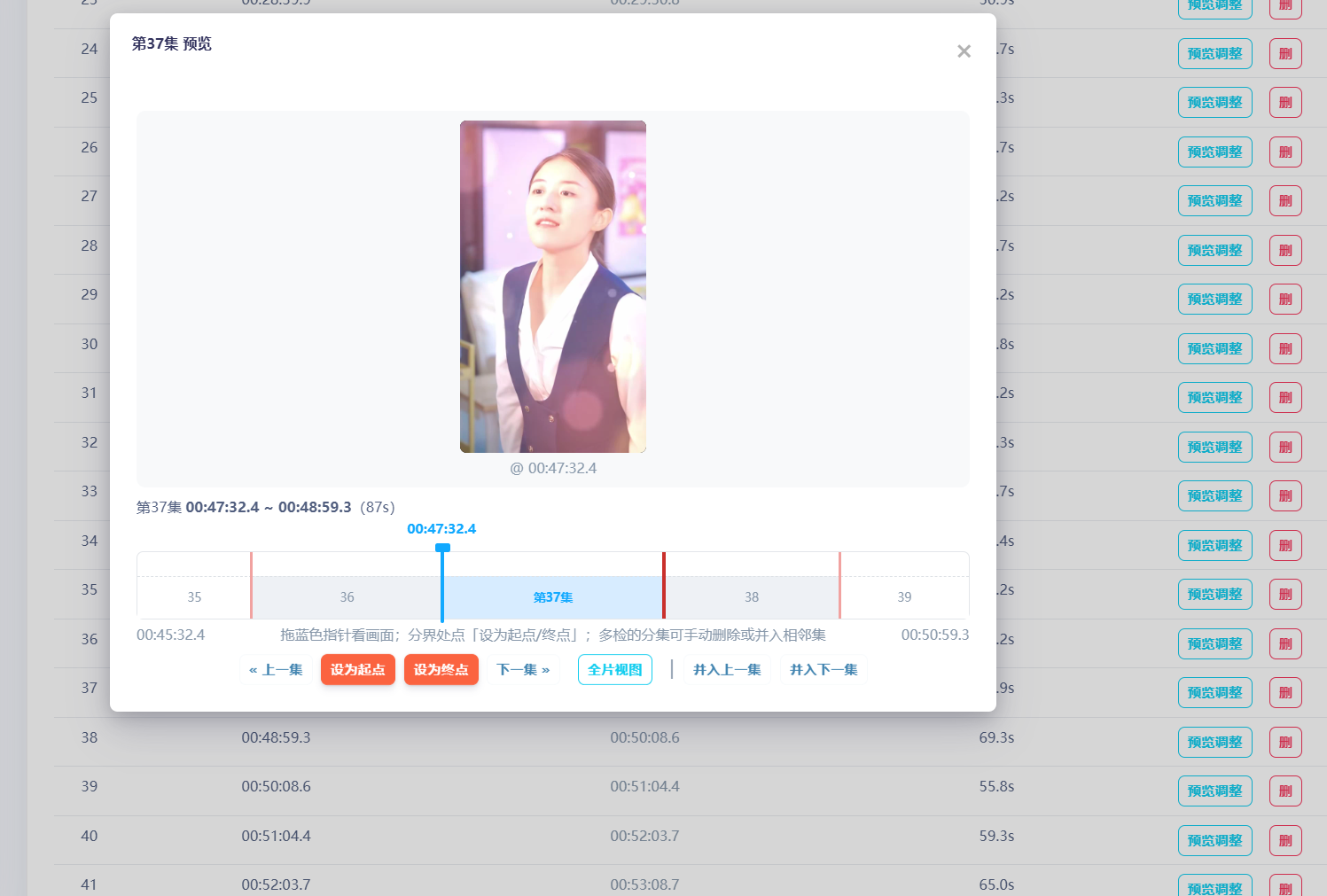
After confirming the split, the system completes cutting in seconds via stream copy, automatically database ingestion and enters the transcoding queue. At the same time, you can bind the series, meaning after transcoding is completed it will automatically be added to the series and sorted by episode number; the merged video can be kept, or you can check the option to automatically delete it after splitting is complete. No command-line operations are needed throughout.
Interstitial Ad Retention and Playback
Finally, interstitial ad retention. The download center's interstitial ad removal has always automatically identified and removed ads, but some users worry: is what was deleted really an ad? Could it mistakenly delete part of the main content? Previously, once an ad segmentation was removed, it was gone, and to verify you had to re-download and compare yourself, which was very troublesome.
Now, after successful identification, the system will automatically pull the identified ad segmentation back from the source, losslessly combine it into mp4 and retain it on the server; the download center list will show the ad identification status of each download—pending detection, no ad detected, or N ads detected. Click once to play it back directly in a pop-up, and it will prompt the remaining retention days, making it clear at a glance what was deleted.
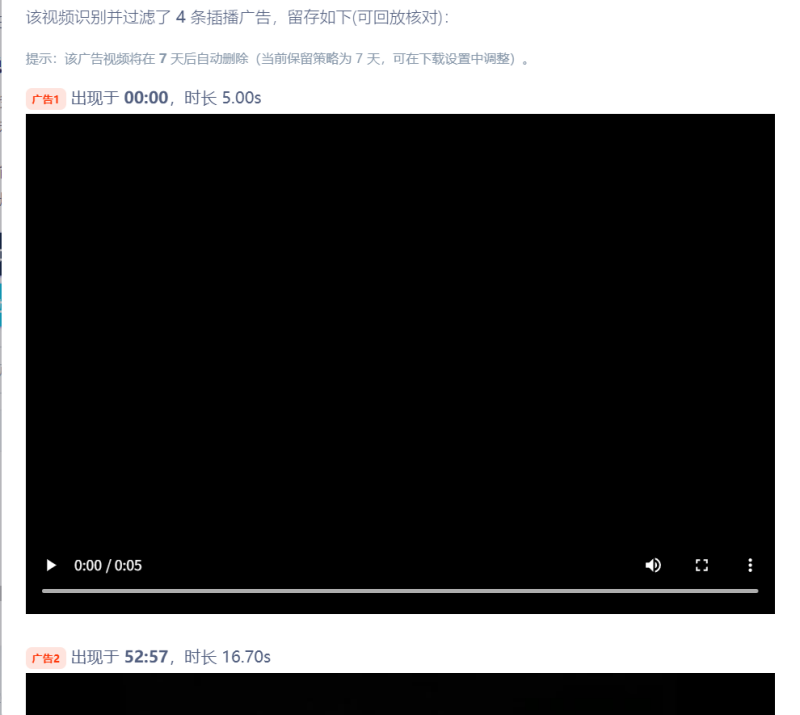
Retention won't take up space forever either: the retention days can be adjusted in settings, and the system will automatically clean up expired retained files on a schedule; when deleting a download record, the corresponding retained file will also be cleaned up, leaving no junk files.
Combined with this update's strengthened recognition algorithm (only confirmed ads are deleted, with multiple safeguards against mistaken deletion), the ad-removal feature can now be enabled with confidence and you can see what was deleted.
The above are the main contents of this update; we won't list more details one by one.