
Remote GPU transcoding and AV1 segments added
We have added quite a few things recently. Here are two to start with: remote GPU transcoding and AV1 segments. One improves speed; the other reduces file size.
Remote GPU transcoding
EFV already supported local GPU acceleration for transcoding, which works well for sustained workloads. However, one situation was not adequately covered: you have a relatively small video workload, occasional batches, or a backlog to clear, while your local CPU is modest and transcoding jobs keep queuing up.
This demand is temporary. Renting a graphics-card server long term for occasional peaks lasting a few days is not cost-effective. GPU servers are often rented as whole machines on monthly contracts and are expensive, while your peak workload may end within a week. The machine then sits idle for more than twenty days, but you still pay for it.
That is why we added remote GPU transcoding. The idea is simple: keep the local setup, send the encoding stage to a remote GPU, and automatically retrieve the results. Start an instance when needed and delete it when the work is finished, paying only for the period in which you use its computing power. Existing watermark, subtitle and watermark-removal features remain fully compatible during remote transcoding, including the progress bar in the interface.
Processing workflow:
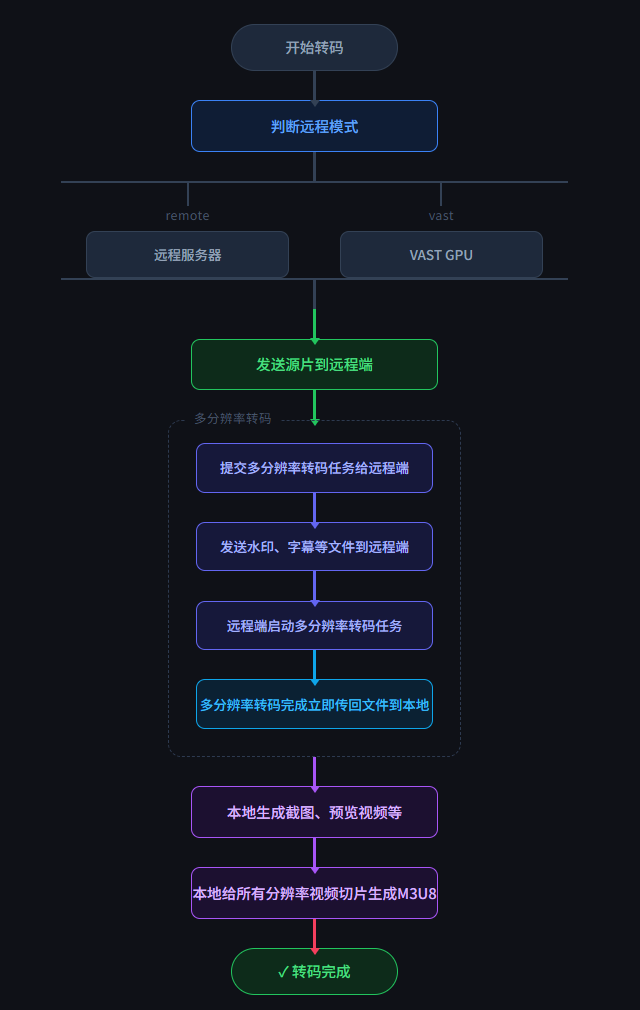
Two remote options are currently supported. Remote-server configuration suits users who already have access to a GPU server or a more economical provider. VAST configuration offers hourly billing: start an instance, use it, then delete it when transcoding finishes.
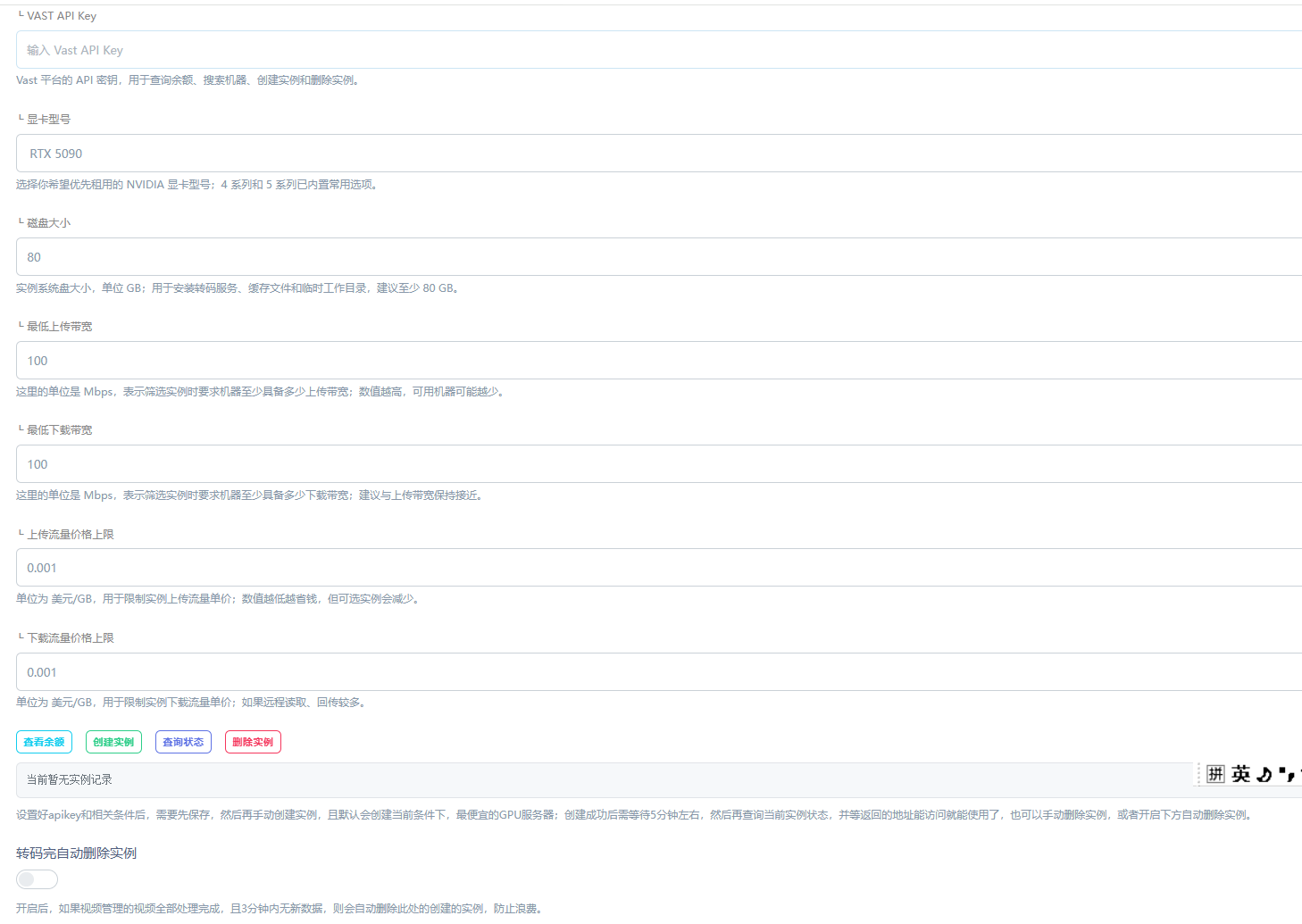
EFV can also create and manage VAST instances directly from the administration interface, making it easy to get started:
Why recommend VAST?
Who would not want a 5090 or 4090? However, buying one or renting a machine long term involves a significant commitment for individual developers and small teams.
VAST is one of the temporary GPU rental providers I have seen with good value and a broad selection of graphics cards. It offers hourly billing and flexible prices. My suggestion is to collect videos into a batch, then start a GPU instance to transcode them together. EFV automatically deletes the instance when finished, stopping billing. Almost all GPU time goes toward actual jobs, rather than leaving an idle machine running.
For example, transcoding 100 videos a day on a rented 5090 costs roughly 0.45 US dollars per hour, around 1 US dollar per day, or approximately 30 US dollars per month. Actual costs vary, but this differs substantially from buying a graphics card or renting a server long term.
Usage recommendations
If you consistently have a large transcoding workload, install EFV directly on a GPU server. A local deployment is the most reliable approach for sustained heavy loads.
If you only need occasional acceleration, use remote transcoding with VAST or another service that supports temporary rentals. Start an instance for a batch and delete it afterward. You gain speed without a continuing idle-server expense.
Transcoding to AV1 segments
AV1 is widely regarded as a next-generation replacement for H.264, and platforms such as YouTube and Netflix are promoting it. The most immediate difference from H.264 is smaller files at equivalent image quality. How much smaller? In our tests, 1080P 1000 bitrate AV1 already exceeded the quality of 1080P at H.264 2000 bitrate, with nearly half the file size and a better picture.
For a video website, that means lower storage and bandwidth costs. The difference may be less noticeable with few videos, but as the collection grows, smaller segment files directly affect server, storage and CDN expenses.
Why was it not used before?
There were two reasons. First, it was slow: early implementations relied on CPU software encoding, producing small files at a high processing cost that was impractical for production workloads. Second, compatibility: browsers, players and devices did not fully support AV1 in earlier years, so users might not be able to play the output.
The current situation
On newer GPU hardware, encoding speed is no longer the main concern. This update specifically adapts the encoding parameters. On a 5090, for example, GPU encoding to AV1 is now close in speed to encoding to H.264, with little noticeable difference.
Compatibility has also improved considerably, although it is not yet 100%. Chrome, Edge and Firefox support it, so desktop playback is generally fine. Mobile support depends on the chip: high-end models generally work, while some mid-range, low-end and older devices may not. Devices with clearly supported AV1 hardware decoding in Safari currently include the iPhone 15 Pro, M3 series Mac, M4 iPad Pro, and relevant newer devices.
If you mainly use it in an App, compatibility is easier to control: software decoding is possible without hardware decoding, although older devices may face performance and power-consumption issues at high resolutions. For web playback as well, consider your users' devices before switching directly to AV1 or continuing with H.264.
Given current trends, major platforms such as YouTube and Netflix continue to promote it, and hardware vendors are adapting too. The industry generally expects mainstream AV1 coverage around 2028. The direction is clear, but a transition period remains.
That is all for this update. We are gradually filling gaps in the transcoding workflow, with more improvements in development.


