June 9, 2020 Update: System modular architecture, building a block-based system, fixed some bugs, started building the fluentAPI stream system
With the popularity of SAAS and serverless over the past two years, I began to rethink the future of streaming media systems. The future of streaming media must be modular, must be SAAS-based, must be serverless-based, maintenance-free. Servers exist as complete streaming systems, storing no content, and exist only as transcoding services. At this point, the cloud transcoding streaming media system should be redesigned, modularizing the functions of the entire system, allowing users to build their own transcoding workflows like stacking building blocks, such as transcoding API, segmentation API, screenshot API, animated image API, thumbnail API, segmentation cover API, merge video API, fully modularized, with users assembling their own transcoding logic. Since the transcoding system no longer stores any content, it can serve as a cloud server distributed architecture. One master control controls hundreds of servers. The master control provides SAAS services to users. Users preconfigure the transcoding workflow in the backend. For example, user A logs in to the master control, generating user A's dedicated apikey and apisecret. The preconfigured transcoding workflow is: upload video to Qiniu Cloud —> call screenshot API take screenshots before transcoding video 6 images —> transcoding API transcoding video to 360P/480P/720P three resolutions —> segmentation API will transcoding completed video segmentation —> screenshot API screenshot segmentation completed video screenshot —> preview image API generate preview image —> animated image API generate animated image —> call Qiniu Cloud API upload segmentation and images etc. —> call delete API delete Qiniu Cloud original video and transcoding content on the program server —> callback notification domain. After users preconfigure the entire workflow, they can set it to be integrated into a self-use API. In their third-party systems, through apikey and apisecret, call this API, and they can complete all preset transcoding tasks. For some more complex operations, such as removing scrolling text watermark removal, etc., users can preconfigure through the master control backend, and finally add parameters in API to carry out more complex transcoding workflows. Finally, the master control uses polling to query idle servers and automatically assigns transcoding tasks.
Its entire architecture will be arranged and combined in a fluentAPI manner.
Update Log
Fixed an issue where filenames of subtitles srt or ass containing [] or other special symbols caused errors.
Separated the database ingestion folder and the upload folder to avoid conflict issues between uploading and database ingestion.
Rewrote, during review and before transcoding, the real-time preview, as well as, in the watermark removal and scrolling text settings, the streaming media API. Now dragging the timeline returns screen captures in real time without waiting, and the effect is excellent.
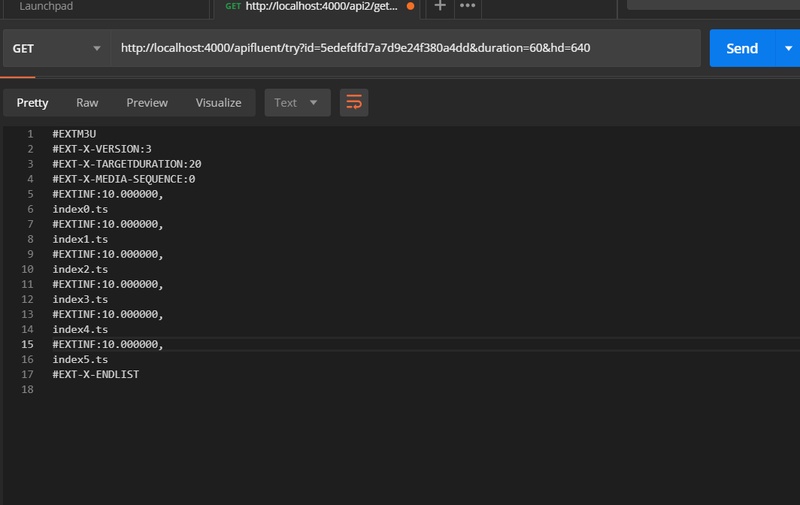
Added fluentapi, which takes video id, trial viewing duration, and resolution, and returns the m3u8 stream text for the specified trial viewing duration, as part of modularization.
Trial Viewing fluentapi Usage Introduction
GET:  /apifluent/try
headers:{apikey, apisecret}
query:{id:视频ID,duration:试看时长,hd:指定分辨率}
duration和hd为可选项,不传递则直接返回视频支持的最大分辨率的60秒的试看m3u8文本。
return: 试看m3u8文本
This API supports distribution configuration. If distribution is enabled, a distribution domain name will be automatically assigned, and multiple distribution servers can be load-balanced.
Do not use this API directly on the frontend; please call it from the backend, and build your own m3u8 route based on the returned stream text.
Screenshot