
EFV subsystem separation: standalone watched-folder synchronization with extension filters, post-sync deletion and retries
EFV now exceeds 20,000 lines of code. I am gradually separating important subsystems into small standalone applications with more freedom than embedded components. Here is the independent fully automatic watched-folder synchronization system.
Automatic watched-folder synchronization
- One: Supports
minio,s3, AlibabaOSS, Upyun, Qiniu andwasabi, covering most major storage providers. Choose the service suited to your needs. - Two: Freely configure watched directories. Beyond
EFVsegment synchronization, use it for the clean edition or any directory requiring synchronization. - Three: Configure any number of excluded extensions. These files are not synchronized, useful for unnecessary files. For example, distribution in the built-in
EFVCMSmay need onlyTSfiles; exclude images andm3u8. - Four: Configure whether sources are deleted after synchronization. Watch
EFV'spublic/videos, synchronize outputs immediately after transcoding and delete originals to save space, an important part of storage integration. - Five: Exclude extensions from post-sync deletion. Synchronized files with these extensions are retained. For example, synchronize all files but retain
m3u8forEFVdistribution. - Six: Failed uploads retry automatically, existing cloud files are not uploaded again, and system errors trigger restarts. Operation is unattended and does not affect the main
EFVtranscoder.
Example
Operate with the advanced built-in EFV CMS (tip: the EFV CMS has reached 2.0; a changelog will follow). Use a cloud-storage domain in distribution, synchronize ts, jpg, png, gif, mp4 and related files, retain server-side jpg, png and gif, delete synchronized ts, and do not synchronize m3u8.
Settings screenshot
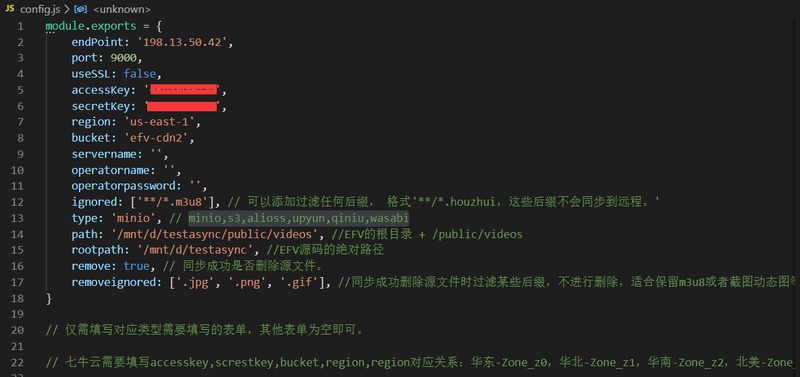
Explanation
ignored excludes extensions from synchronization. Here all m3u8 files are excluded.
remove controls deleting sources after synchronization. Here it is true, enabling deletion.
removeignored excludes files from that deletion. Here jpg, png and gif remain after synchronization.
Workflow
First, m3u8 files are excluded, so all m3u8 are skipped. The program watches changes across folders and synchronizes new segments. After successful synchronization, source deletion applies, except for excluded extensions. Images such as jpg, png and gif are therefore retained, completing the workflow.


